SOUTHLAND MARKETS
Arrowhead Regional
Medical Center
Farmers' Market
400 N. Pepper Ave.
Colton, CA 92324
Wednesdays 8:30 - 1:30
Historic Downtown
Farmers' Market
5th Street @ S. Spring Street
Los Angeles, CA 90013
Sundays 9:00 - 3:00
Kaiser Permanente
Baldwin Park
Farmers' Market
1011 Baldwin Park Blvd.
Baldwin Park, CA 91706
Fridays 8:30 - 1:30
Kaiser Permanente
Panorama City
Farmers' Market
13652 Cantera Street
Panorama City, CA 91402
Wednesdays 9:00 - 1:30
Marina del Rey
Farmers' Market
Via Marina @ Panay Way
Marina del Rey, CA 90292
Saturdays 9:00 - 2:00
Kaiser Permanente
Anaheim Farmers' Market
3440 E. La Palma Ave.
Anaheim, CA 92806
Fridays 9:00 - 2:00
Kaiser Permanente
Irvine Farmers' Market
6670 Alton Parkway
Irvine, CA 92618
Wednesdays 9:00 - 2:00
Kaiser Permanente
Woodland Hills Farmers' Market
5601 De Soto Ave.
Woodland Hills, CA 91367
Thursdays 9:00 - 2:00
FOR CONSUMERS
>National
Farmers' Market Map
>Why
Shop at SFMA Markets
>Price
Comparison Study
>What's
in Season?
>Events
& Happenings
>Recipes
& Articles
>Notable
Links
ABOUT SOUTHLAND
FARMERS' MARKET ASSN.
>Our
History & Major
Accomplishments
>Our
Code of Ethics
>Statement
of Values
>SFMA
Consulting Services
>How
to Sell at a Market
>SFMA
Board of Directors
>Nonprofit
Status Info &
Financials PDF Download
|
Southland
Farmers' Market Association
Type Too Small?
If the type on this and other sites is often too small,
the best solution is to change the resolution of your monitor. Then not
only will web sites be larger but so will word processing documents and
all the other content you view on your computer. (This is better than
changing the size of the font in the browser which often distorts the
web page layout.)
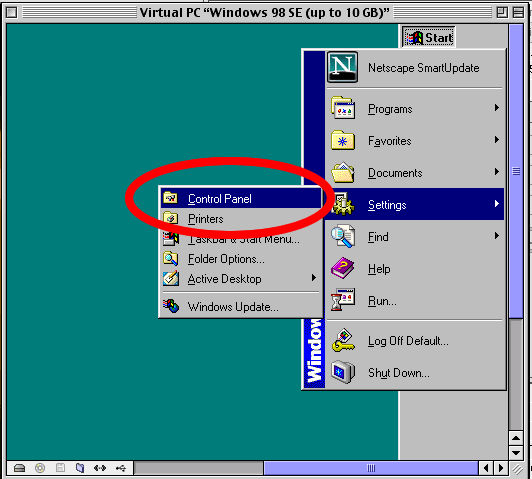
To change screen resolution on a PC:
1. Go to the Start button in the
upper left corner (or wherever you have it displayed), open Settings,
then choose Control Panel
(see screen shot at right).
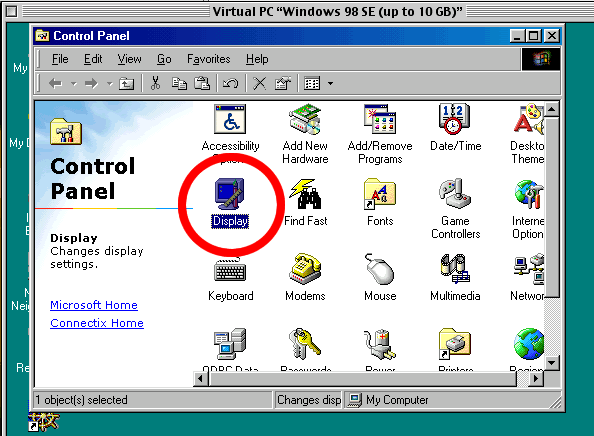
2. In the control panel,
choose Display.
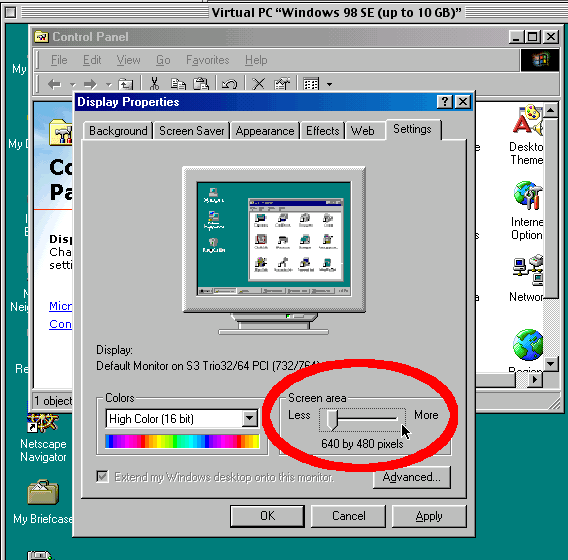 3.
In the Display Properties panel, click the last tab on the right to reach
the Settings. Move the Screen area
lever to the left to enlarge what you see. Important:
Be sure to hit the Apply key, then
OK, or the change won't take effect. 3.
In the Display Properties panel, click the last tab on the right to reach
the Settings. Move the Screen area
lever to the left to enlarge what you see. Important:
Be sure to hit the Apply key, then
OK, or the change won't take effect.
Experiment with different settings
to see what works best for you.
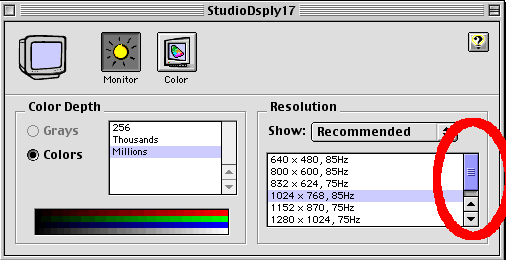 To
change it on a Mac: To
change it on a Mac:
1. Pull down the Apple menu in
the upper left corner of the computer screen. Select Control Panels and
hold it until the longer list appears on the right. Select Monitor.
Choose a smaller screen resolution than
the one you've been using.
Experiment with different settings to
see what works best for you.
|
At a Southland Farmers' Market, you are assured that you
are purchasing quality produce from certified local growers
and producers. Southland Farmers' Market Association serves
member markets, local California farmers and consumers by
promoting and protecting the integrity of certified farmers'
markets in Southern California.
|
|
Photos by David Karp
© 2002 Southland Farmers Markets Association
All Rights Reserved.
Website design and development by
Organic-Design.net
|


 Website/newdesign/test/spacer.gif)